
Coding
Basic Code
This is the section on how I did my basic walking and turning code. I firstly added my OBJ_Rat can created both a 'create' event and 'step' event ; In the step event I started by creating my basic variables so I can re use them in new code if I wish. These being ' Var_Key(X) = Keyboard_Check(ord("x"))' ; this code states when the 'x' key is pressed on a certain Key(x) variable the OBJ_Rat will move in that direction. I used W A S D as my main movement as it's the most common use of 2D movement you see in these games as the last project using the arrow keys proved difficult of most play-testers. After adding my basic sprite for the OBJ_Rat I created a sprite index change by using if statement and image_speed / index to make he sprite turn in the desired direction. I created both an idle sprite and walking sprite so when any key is press in the variable that rat will apply the walking sprite, if false they will stand idle. To make the rat face what way it's walking I made an IF statement saying 'IF facing (left) image_xscale =1 else = -1.To make the animations work when they are active I split each frame into a sprite sheet and resized and imported it into GameMaker to make them be able to walk properly constantly. This means when facing left the sprite is un-flipped but me right the sprite will flip. This code technique will help my sprite work look smooth as he turns and makes my game playable by having the abilty to move


Parent
This is the section on how I made all my NPC's inherit the same traits in code. I firstly added my OBJ_Greyman accompanied by his sprite as he the basic NPC I will use and created both a 'create' event and 'step' event for the future. I then added both OBJ_ and SPR_ Blue/Red Women and Green Man into my game and used the create parent option and made them all children to the Grey Man. By doing this I can add the same code for all npc's as long as I use the Grey Man and still being able to add extra code for each NPC if necessary (example being different player speeds). This code is beneficial for my FMP as it will help with adding code in the future for most NPC's so I don't need to re do all code each time , this also makes my work and code neater and easier to understand , which shows my coding competences.


Describe your image
Describe your image
Path Finding
In this section I made the system were the NPC's walk across the screen and disappear. To create this code I used the pre made parent I did earlier in the project with the gray man to make the other NPC's be able to walk around the map. I did this by creating speed variables- such as 'right X =' - in the grey man stating how far to walk on both sides of the canvas size, I then state when off screen to instance destroy ,doing this makes sure the npc's won't get stuck off screen. This worked since by adding the prior parent code all inherited code for the grey-man copied over to the other NPC's making them follow the same guide lines. I then changed the left 'walk towards point' by moving their Xscale down sow they didn't walk into each over and to give the player more from to see. This helps improve my FMP by having a unique mechanics others don 't by making the 'busy street' idea look more realistic as it shows different people ate different speeds walking along giving the player a motive to keep of their toes to find the right person to infect.


Collsion
In this section I started the basic collision. I started with my prior knowledge with my made basic W A S D walking mechanic so to adapt a collision mechanic I added a collision mask to my basic sprite. By doing this the simple green block I will add a rat sprite over I can now add collision to the game. I also add the base background to line up any future collision walls. I created an OBJ_Collisionwall with a mask so when both the OBJ_rat collide with it it show stop the rat from moving forward.However, I encountered an issue where the rat sprite was embedding itself into vertical geometry. The sprite animation of the player was pushing the bounding box of the player into the wall, meaning a collision was occurring. I changed the player sprite to a green box and drew the animations on top. Whenever a change in animation happened (going from idle to moving and vice-versa) I changed the collision mask of the player to your box sprite. This regulated it across each activated sprite and prevented the rat animations from encroaching on the wall.


Timer
In this section I created a basic off screen timer. I first created a new sprite-less OBJ_Timer and added into the create code it's variables for each minute, second and millisecond. I did this by stating the new variables: [(t_min = x , t_sec = x and t_mil = x) and decided I wanted one level to last only two minutes so I made the (t_min = x means , t_min = 2)[ while the other x's equals 0. I then created one alarm and stated that it equals 6 , which means on the 6th frame the alarm will go. In the alarm I wrote : [t_mil -= 1
if t_mil = -1 {t_mil = 9 t_sec -= 1 } if t_sec = -1{ t_sec = 59 t_min -= 1 }[. This means when timer reaches near amount of time do next action, if not continue the count down. I then added this peace of code to make sure that the timer would always work properly : [if !(t_sec = 0 && t_min = 0 && t_mil = 0){ alarm[0] = 6 ]. By doing this I can make sure that when game starts always reset timer to 0. I then added the last bit of code else = game()end. This means when the timer hits two minutes the alarm will set of making the game end. By adding this to my FMP I can create a simple mechanic that helps give the game pressure and a time limit.


Health
In this section I created a basic health system that leads to a death screen if you die. I firstly, imported all three versions of my hearts as I want to give the rat 4 HP as the red women is the only one who can harm them. I then went into the OBJ_rat create event and created three variables : HP ,DEAD and HEALTH_SPRITE. In their step event I added a section with //health and made the if statements ' if HP = 0 dead = true and if dead = true set of an alarm but change the OBJ_rat's sprite to SPR_deathrat for 58 frames'. This means if you lose all HP a death animation will play. The alarm states 'Room_goto( Room_dead) , this means after the sprite animation send the player to a new black room with the new death screen. I later added a button were you can go back to the menu with the same process to make it so you can replay the game if you die. However, this caused many issues such as the change room variables no longer working and the rat not going to the room, I fixed this by realizing I added two OBJ_games , which fixed the change room issue but then I changed the aspect ratio of the death room to fit the camera to make sure it can be used properly. To make the heart I added in the OBJ_game a draw GUI event and made the statements 'If HP =(X) change the Spr_(X) to another Spr_(X) ; this means when you lose HP with heart sprite will change giving the player 3 chances to live. By doing this I can have a health system to my game, which makes it more enjoyable as their is now a real threat if you make the wrong decision. This helps to improve my FMP by having a new system that create problems for the player if their not careful.

Describe your image
Describe your image


Room Change
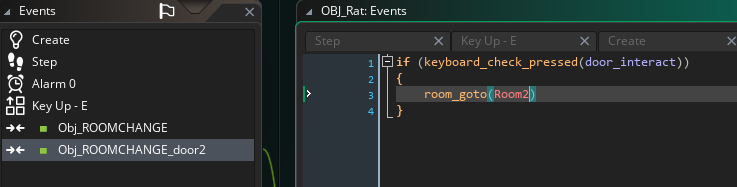
This is the section on how I made the rooms change I used the new rooms and new OBJ's to be able to make this process seamless. I first created a statement in a new OBJ_roomchange that 'changing_LVL = true and created an alarm. I then made it so when the OBJ_Rat sprite interacts with the new OBJ it will play the SPR_squeeze. I then added into the room the OBJ_roomchange block on both rooms so when the OBJ_rat is in the collision box created before and 'press R' it will do the interaction. I then made sure that the sprites wouldn't change size or scale when a new sprite is implemented - I did this this with the code documented. In the alarm I then added and if statement which, suggests when interacted with the collision box = true play new squeeze animation fully then (room_change) to the second room in the same spot. I then duplicated this code for the second room to make it true but instead of going to room two it goes to room one. By doing this I have a unique way to change rooms to make my game feel bigger and have more option to play as. I could then add new mechanics for each different object in both rooms to make my game more interesting. This applies positively to my FMP by having a fun way to change room with a sprite that realistically mimics a rat going to another part of the street, I can expand on not only mechanics and ideas but world building as it makes the street feel more lively seeing it at the front and back.


Describe your image

Describe your image
Biting
This is the section on how I made the rat be able to bite the NPC's. I first used the grey man as he is a parent sprite and using him means I can have the same code of all NPC's ; I added in the create event the main variables : bitten, flash alpha and flash colour. In the step event I made an if statement that indicates that if the rat presses (E) the sprite bitten will run faster and change sprite. To be able to have the rat bite the I went into the OBJ_rat and set a variable 'can bite' to false so the rat won't constantly bite the NPC's I then set an alarm that triggers when an NPC is bitten to add it to the total play score. By doing that I can make a future score system work when I implement it fully. However, I wanted to make it more visible when an NPC is bitten besides the different sprite change and speed. So i tested a new feature to me the Shaders feature , I want to have it when bitten the sprite will flash red. I did this by adding in the parent NPC an if statement that if bitten is true flash red of about 0.05 seconds. Sadly this was very difficult as I faced a problem were when bitten all sprites would glow red so after a while I figured out I need to set the shaders to different index's of each NPC. I did this by adding this the shaders a draw_sprite_ext , which will make sure the sprite stays the same and the same scale when flashing red ; I also helped by making sure that it would always flash red by making it it's own variable. I then made sure it reset after flashing so it wouldn't constantly flash and in each NPC OBJ I added a code for when (X) index is bitten only this sprite will flash red and this fixed my issue. By doing all of this I can have a playable game with an end goal and help the player see how has or has not been bitten. FMP wise this is helpful as I have listened to feedback to better my game.


Random
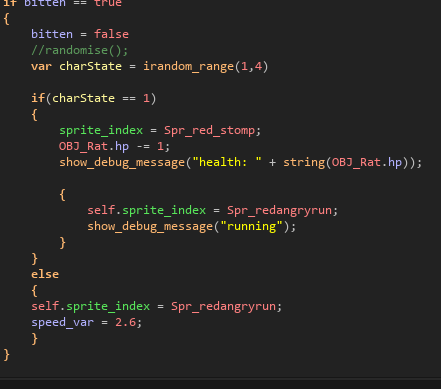
This is the section on how I made the random mechanics for each NPC to make the game more unique and each NPC feel more alive and difficult. For example with the blue women I wanted to give her a chance to run of crying fast than her normal upset walk. I firstly added both her crying sprite and her upset sprite, I then went into her OBJ but as she is a child to the grey man I had to open the inherited event to be able to change it. Using the biting code from before I used its existing if statement and adapted it, I did this by adding a new variable called charState (this will make it show what ever numbers I give it it will randomize between them). I set the charState between 1 - 4 to give the crying chance a 25% chance to happen ; I then change the original if statement and added another if statement inside , which details is bitten roll charState = 1 which becomes the crying run but if not play charState =3 which becomes the upset sprite instead. This means if bitten the game will have a 25% chance to land on the crying sprite but a 75% chance on being normal. However, I faced a problem were when bitten she constantly changed in between both sprites, with some help form peers I figured out the issue was I needed a bitten false statement to stop it from constantly changing. By figuring this out I have made this mechanic work perfectly as intended , so now my game can be more fun and unique. I did the same thing with the red women but added a health variable like the on from before. I used the same sprite logic and charState but added code that says, if red women does stomp the rat loses 33.3% hp if not stomp she runs away angry. By doing this I can have an NPC that is a real threat for the player , which builds tension and strategy. This improves my FMP by have unique character that do different thing I can make my game more fun and make people feel for them as they have a lot of human quality's.


Score
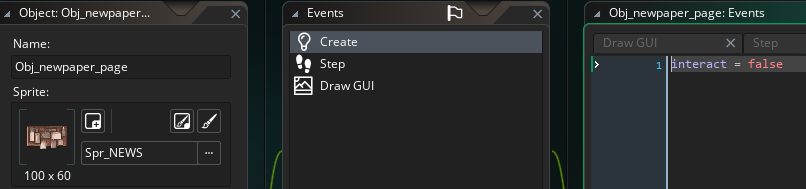
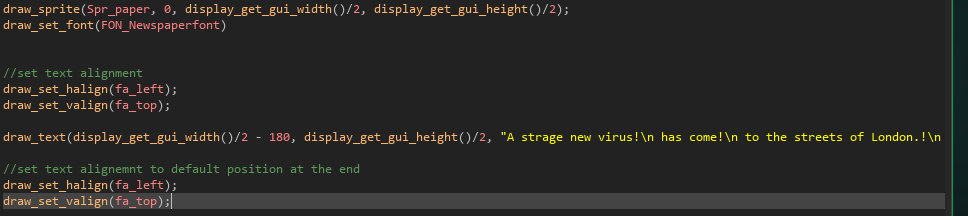
In this section I focused on a score board system for my game to make the player see how many people they have infected. I first, imported my newspaper sprite and made it both a sprite and an object in GameMaker and made a base create , step and draw GUI event. I then added a statement in the create event called "interact" that will be the main variable when I want the rat to interact with the newspaper. I then in the step event created a collision box for when the rat is inside it and presses a certain button it will "interact" with the newspaper ; by doing this I can make it so the newspaper increases in scale and shows up on the screen. I then added in the draw event the st text colour / text I want to add, this is both for the main score presented and the button that say which button to press. I then went into the OBJ_rat's step event and created two if statements dictating the global.interact_range. They both state, if its true that the board is being interacted with increase room size to show OBJ_newspaper bigger and create a score when people are bitten. Else if it's false and the rat is no longer interacting with the OBJ_newspaper instance destroy it and don't change rooms. By doing this the rat can now fully interact with the board when they press the interact variable, this will not only show the working score but when interacted with the OBJ will scale up and cover the screen. To set the score I created a draw GUI event were the OBJ_newspaper will be able to scale in the x and y variables correctly ; this is were I imported a new font. I then set the text location and created the display text in the " " using the terms .!\n to create a new line. This will allow the player to be able to see their score in a fun way using non diegetic UI to my advantage to make it real like the infection is happening in real time. This impacts my FMP positively as it make my game have a unique mechanic to find out how many people you have infected in a helpful and not obvious way to draw you out of the game.


Sight
In this section I focused on a small mini-game that focuses on the NPC's sight. I firstly, imported all butcher related sprites, including his three main ones and his background into GamerMaker and and them into both sprites and objects. I then created a new room and added all the butcher stuff in their and set up collision walls for the rat when he enters. I then created another room_change collision so when you enter a certain hole the rat can squeeze through into the new butcher room. I then created a new OBJ_butchervision and added in the create event a statement called "detection" and "detectionMax" and set it to zero. I then placed the green block of the OBJ, which will be set to visible = false later, in the sections I want the butcher to notice the player and make it so the player can hide behind the meet for protection. I then created in the step event statements that state if "detection" = true when OBJ_rat collides with the collision box increase from 0 to 100 to "detectionMax" , this will make it so when your in the box the number will go up until one hundred. I ten added another step event statement, which says at a certain number begin (X) butcher sprite, by doing this I can give the butcher and idle animation, when your almost seen an alert animation and when it hits 100 a kill animation that will give you a game over. By doing this I can create a fun working mini game that will have a good reward when beaten and a working sprite that "follows" the player. FMP wise this helps with game-play as it gives the player a new objective and a fun new mechanics to play with but it also helps with world building as the player has to think of strategy to make sure the dynamic butcher does't find you contaminating the food.


Mini -Game
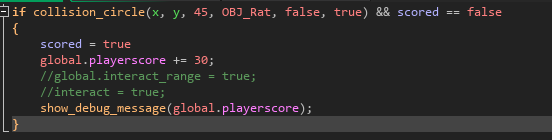
In this section I focused on giving the mini-game a prize if you beat it. I made it so when you cross the counter safely you can contamination their food and get a +30 infection. By doing this I can have a fun game that can build a story as it shows this butcher is their main food source. I did this by adding in the OBJ_infection+ a step event that means ' if the OBJ_rat collides within the collision box the scored variable = true and increases your player score once by 30. By doing this I give the player a reason to want to risk the mini-game by having an ability to gain more. FMP wise this helps with the strategy part of my game.

Sprites
Blue Sprites

Vomit
This animation is for a small cut scene at the mid-point of the game to show the damage you have done. I used a mix of tweening and hand drawn animation to make you feel empathy for this character as she is a victim of your blind destruction. This help improve my FMP by creating characters and art that invokes a reaction from the player , causing pity, game wise it improves it on how layered my art is by having a small cut scene to change the tone of the game is an unique quality.

Walking
This animation is the main walking animation for the blue women. To create this I separated her main body parts into sections and drew them to be used for other sprites that she needs. I then tweened together her body parts to make it looks like shes walking. I then made a hand-drawn animation for her hair and skirt to make it look realistic and flow like. Adding this to my FMP gives me a pretty NPC that I can use in my game.

Crying
This animation will be played when she is bitten by the player and has a chance to call over other people to run with her. Like the vomit animation I used the same technique and changed her body position to make her hands over her eyes look more natural. This elevates my FMP by having more personality in my characters by showing she gets overwhelmed easily ; this also help with a unique game mechanic by chosen if its worth it to bite her as people might run with her for comfort.

Dead
This is a simple dead stand alone sprite, This has no animation as its purpose to to become decoration later on in the game. I used her body parts and hand drew her pose and hair to make it look more realistic. This pose conveys her young and innocent personalty as in her final moments she comforts herself my tucking her legs into her chest as she dies. Adding this to mt FMP I can easily create emotion by showing her personality just by how her body lies.

Illness
This animation will play the nest few days as the infection counter increases ; ether a normal or ill blue sprite will walk as the chances of the normal decrease over time. I added , sick and red marks over her walking sprite to keep her on model and to look realistic for the plague as excessive vomiting was common. FMP wise this help create world building as the days keep going more and more get sicker and sicker till it's too late for them.

Sad Walk
This animation will have a 3/4 chance of playing when you bite the blue women. This simple animation shows her on the verge of tears as she runs away quickly to go home form the pain of the bite. By adding this I can make the biting more meaningful than just speeding up her walking sprite. To my FMP this shows how I have adapted my sprites and made it look more detailed when bitten improving my games overall visual quality.
Red Sprites

Coin
This animation is the coin drop animation, this will be used to indicate when a new puzzle is ready to go. When you see her drop this you can steal the coin from the vagabonds hat and use it to break down the metal barrier. By adding this animation to my game I can build more character with NPC's while having a mechanic that improves game-play. FMP wise this is beneficial as it makes my game stand out by having unique NPC's that show character without dialogue.

Stomp
This animation is the stomping animation, this will be used to harm the player randomly when bitten. When bitten she has a small chance to damage your health by quickly stomping on you. By adding this animation to my game I can create a problem for the player and make them think to who you should bite next. In my FMP this is important as it makes my game have a level of difficulty and makes they player have a high risk high reward thinking thought the game.

Illness
This animation will play the nest few days as the infection counter increases ; ether a normal or ill red sprite will walk as the chances of the normal decrease over time. I added , welts and rashes all over the face, puffy eyes and a skinnier appearance as these symptoms were common back then. For my FMP this will help create world building as the days keep going more and more get sicker and sicker till it's too late for them. And show the range of effects this had back when people were killed by this disease

Walking
This animation is the main walking animation for the red women. To create this I separated her main body parts into sections and drew them to be used for other sprites that she needs. I then tweened together her body parts to make it looks like shes walking. I then made a hand-drawn animation for her hair and skirt to make it look realistic and flow like just like the blue women. Adding this to my FMP gives me a stern NPC that I can use in my game.

Dead
This PNG of the red women will show throughout the last levels showing her body as she was succumb to the infection. I wanted to convey her disappointment from dying in the open so she covers her face yet her body is turned to people showing deep down she longed for help and a connection to people. By doing this I create a character without words making my game feel impact-full FMP wise doing this means I have unique and thought out NPC's.

Angry Walk
This animation is of an upset and angry red women when you bite her. She will have 3/4 chances to show this animation when bitten ; she gets upset when hurt since she feels weak letting something as small and useless as a rat harm her. I re used her walking sprite and hand drew some new elements such as the red haze and angry thought bubbles. By doing this I can create personality within my characters without needing dialogue For FMP this shows my detail in body languages as I can create a obvious depiction of someone being upset .
Green Sprites

Picking
This animation is the picking up sprite, were the green man when bitten will stop what he is doing and 'save' the blue women. I tweened his body to bend down and raise his arms and used stretch and squish to morph his body to make it look more natural. By doing this I can have a unique animation for him to make game-play more fun. For the FMP this animantion shows my artistic skill and ideas on how to create more intresting gmae-play.

Up
This animation is the blue women picking up sprite, that will play when the green man is bitten he has a chance to grab the nearest blue women and take her to "safety". I tweened the blue blue women's body parts and hand drew frame by frame her hair falling in place when lifted, I also added hands on her body to show shes being picked up. By doing this I can show character since hes a charmer and shes a damsel showing his heroic nature by making sure you cant bite her, yet if he is ill he will infect her by accident.

Illness
This animation will play the nest few days as the infection counter increases ; ether a normal or ill green sprite will walk as the chances of the normal decrease over time. I added , red swollen eyes, rashes eye bags and mass amount of hair loss as this was a common symptom of the black death.For the FMP this help create realisum in this game by depicting the brutal reality of a plague like this and makes my game more gory and darker.

Walking
This animation is the main walking animation for the green man. To create this I separated his main body parts into sections and drew them to be used for other sprites that he needs. I then tweened together his body parts to make it looks like hes walking. I then made a hand-drawn animation for his hair and coat to make it look realistic and flow like. Adding this to my FMP gives me a charming NPC that I can use in my game.
Dead
This is a simple dead stand alone sprite, This has no animation as its purpose to to become decoration later on in the game. I used his body parts and hand drew his pose and hat to make it look more realistic. This pose conveys him as more of a sympatheic charcater as he shows his selflessness by reaching his arms out like he's trying to help someone in his last moments, yet he is oblivois that near the end he was helping spred the infection. Adding this to my FMP I can easily tell a story on just how a NPC died showing their personality.

Sad Walk
This animation will always play when the green man is bitten. I used the walking sprite but added more hand drawn elements such as , sweat beeds on his face and shade to make him look uncomfitable rather than angry or upset. By doing this I can make the biting aspect more realistic as it shows that hes upset when injured but wants to play it of cool to show of his 'manlyness'. By adding this to my FMP I can upgrade my graphics my my art as it makes the game overall feel realistic.
Grey Sprites

Walking

Angry Walk

Illness
This animation is the main walking animation for the grey man. To create this I separated his main body parts into sections and drew them to be used for other sprites that he needs. I then tweened together his body parts to make it looks like hes walking. I then made a hand-drawn animation for his coat to look more realistic when hes walking. Adding this to my FMP gives me a basic NPC that I can use in my game.
This animation will always play when the grey man is bitten. I used the walking sprite but added more hand drawn elements such as , his angry particles and a slight overcast of shade over his eyes to mimic frustration. By doing this I can make the biting aspect more realistic as it shows that hes upset when injured rather than stone faced. By adding this to my FMP I can upgrade my graphics my my art as it makes the game overall feel realistic.
This animation will play the nest few days as the infection counter increases . I added a paler complexion to him , rashes and bleeding from the ears as that was a main symptom on having the black death. FMP wise this help create world building as the days keep going more and more get sicker and sicker till it's too late for them.

Dead
.
This is a simple dead stand alone sprite, This has no animation as its purpose to to become decoration later on in the game. I used his body parts and hand drew his pose and hat to make it look more realistic. This pose conveys him as more of a comedic character dying in an odd pose, yet it shows how he never took it seriously as he seems to of dropped dead before he realized he was going to die due to him not believing. Adding this to my FMP I can easily tell a story on just how a NPC died showing their personality.
Rat Sprites

Running
This animation is the main running animation for the rat. I used the idle animation as a reference to make sure the rat keeps being on model. I used videos of a real rat running to make sure I get a realistic running animation done to make it feel normal and fluid. I used a mix or tweening for the main body and hand drew elements such as the eyes and tail. By doing this I have a dynamic run that gives the rat a lot of personality. For my FMP adding this dynamic animation ,will make the over all quality high as I can show realism only using pixel art.

Idle
This animation is the idle animation when your not moving the rat. This will show him breathing and wagging his tail. I drew each part of his body, used my references and tweened / hand drew his core components. By doing this I can breath life into a character by having him do small movements a kin to a rat. FMP wise this is beneficial as it will give the rat more life and make it more realistic rather than him standing completely still ; it also shows my attention to detail

Squeeze
This animation will play when you enter a slot to go to a new location. I used my references from my research page to make sure I get the main characteristics of a rat down ; I did this by showing him slightly struggles getting his lower half in the hole as it's much bigger than their heads. I only used frame by frame animation as I wanted this sprite to be as fluid as possible to get my vision across. By doing this I can create a small piece of art that impacts the game by not needing a fade out screen when going to another level.

Dead
This animation is used when you are ether stomped or stabbed by an NPC causing your death. I used the idle sprite for the fist half showing him backing way and turning to run, I then used a hand drawn frame by frame technique with the blood and guts. I wanted to make the impact deep to I used complementary colours to show the different types of blood both in the pool and on the rat. By doing this I create an impact-full death animation that memorable for the player. FMP wise this will help for my death screens by showing this animation the fading to black showing your score


Stealing
This animation is a simple run / idle animation showcasing that the player has stolen a coin form the vagabond. I re used both running and idle animation and hand drew an outline of a coin to look like this stuck in his mouth. By doing this I can easily show that you need this coin to do something and to make sure the player knows that they have picked it up. For my FMP this help as diegetic UI as it show the player your new objective on figuring out what to do with this coin

Breaking
This animation is for when the rat has the coin and breaks down the metal grate. This show a rat charging up and leaping into the side of the gate breaking it down. I used the running sprite as a base and used stretch and squish to make the rat look like hes getting ready to jump. I then added small impact lines to show the power and force used when he hits the metal showing the player that they did the right thing. By doing this I can complete my intractable puzzle to be able to pass the room and help my FMP over all improve with more explored mechanics and ideas.
Plague Sprites

Walking
This animation is the main walking animation for the Plague Doctor. To create this I separated their main body parts into sections and drew them to be used for other sprites that they needs. I then tweened together their body parts to make it looks like their walking. I then made a hand-drawn animation for the long coat and sword accessory to not only be actuate by look appealing. Adding this to my FMP gives me an interesting NPC that I can use in my game.

Spot
This animation is the spotting animation for the plague doctor. This will be played when the doctor spots you giving you a small window to quickly hide. I used the same technique and used the walking sprite as a base sprite to keep the plague doctor on model. I then tweened his body to jolt and hand drew a clear exclamation point to help the player see their alarmed. By doing this I can make my spotting mechanic more through with more art to help the player know when to hide.

kill
This animation will play when either you die my the red women's stomps or get instantly killed by the plague doctor. I have used the same technique to keep them on model by using: tweening, hand drawn elements and stretch and squish to give them more life and fluidity. By doing this I can create a powerful enemy with just demonstrating how harsh and powerful their stabbing is. For FMP this will help elevate it by having another enemy to cause issues for the player.
Butcher Sprites

Walking
This animation is the main walking idle animation for the Butcher. To create this I separated the main body parts into sections( arms, chest head) and drew them to be used for other the sprites that he needs. I then tweened together the body parts to make it looks like hes just board and waiting. I then made a hand-drawn animation a slow blink, doing this makes him look more alive. Adding this to my FMP gives me a more interesting NPC mechanic that can improve the games fun.

Spot
This animation will play when you are spotted by the butcher. I used his cut up body parts from his idle then tweened him to look shocked/angry when hes spots you. I have hand drawn elements such as his face change and exclamation mark appearing. I lastly, used stretch and squish by pulling the inter sprite to make him look more bouncy and alive. By adding this to my FMP I now have a character that can become a problem for the player as you now have to make sure he doesn't see you.

kill
This animation will play when you fail the mini game and get killed by the butcher. He will grab his trusty meat cleaver and launch it towards the screen ending his a bloody mess. I used a mix of , hand drawn, tweeing and stretch and squish to make this animation come to life. I used the 'spot' sprite as a base and hand drew new body parts to look like hes grabbing and throwing a cleaver. By doing this I can create on of the two outcomes with this mini game making it almost complete.

UI

Hearts
I have created some hearts for the health UI as I found a health bar not to look great in this type of game. This is non diegetic UI meaning that it's stuck to the screen and unable to be interacted with ; it darker palettes and more realistic depictions of a human heart (veins, blood vessels) help incorporate the games dusty and pixel art style blending in without standing out like a sore thumb. However, feed back I was given was to outline the hearts as it gets washed in the background at certain points, so I gave heart heart a small cream outline to make it stand out but not overwhelm the screen. By having the heart rot a you get harmed shows both the darkness of this game as blood, death and unpleasant imagery is shown throughout the game but also is a smart way to show you lost health rather than a health bar or having the heart half itself. Losing or maintain your own health isn't the main purpose of the game but having a health system helps keep the player alert not to die and I feel like the hearts do that good very well


Title
I have created a title / recognizable logo for my game, by doing this I can have a game that can be recognized by a logo alone due to it's colours, shape language and style. I based this design of hanging signs most shops used in the Victorian Era (even still to this day) made out of basic wooden and rope material. This helps with the games aesthetic and realism as if I had a floating of typical title card most pixel games have it would look out of place. I also made sure it fit into my games grunge like art style to make it look damp and old, I did this by using dark and de-saturated colours to make it look grey and some what life-less. By adding the games name in blood red font, it shows my game may be dark and have themes of death and destruction, having the title show my games name is important as the title card is what people will be hooked by the most. Having this title in the starting screen makes players remember what game their playing and help other people notice it quicker than other more complicated or simple title screens.


How to Play
I created a simple 'How to play' card by using the PixelArt app. I re used a frame of my plague doctor sprite and edited it to be bigger and make the sword more pointy, like their pointing at a chalk board. I then added a de-saturated green background t make sure the words pop out ; I then used the text feature on the app and wrote in a cream colour the main layout of the player controls / goals. To help people differentiate on what to do I outlined certain words to indicate that they are important to the player (examples being, certain characters and certain buttons you need to use). By doing this layout I can have a clean and funny way to present my games controls without it being to bland or to out of place in my game. Game-play wise this is very important as it tells the player the main information needed to play , so the player isn't annoyed when they get stuck on a certain part of the game. Adding this extra detail for FMP will help my grade improve as I can show imagination on adding things that improves the games over all quality.


Start
I created a start button for my games screen to make the player know were to click to begin the game. I used the same idea on the title card and made the start button a hanging wooden sign , using the same blood font idea to convey the same message. By doing this I can create uniform with my game as by making the title and start button the same I can improve the games visuals as it becomes neat and neutral. I did add some differences such as the sign falling down on one side, this can show how much this button it pressed compared to the over one. To make the button unique however, I added a large black boot that comes down and stomps on the rat when you press start. This adds a unique visual that will stick in the minds of people for a while, it also show my ability to improve a certain mechanic to make it more interesting. For the FMP this will help not only make my game playable but make it have a starting screen to entice players to read the rules and be certain they want to start.


Death
I created a death screen for when the player when you are killed by either the red women, plague doctor and butcher. I re sued a frame form his death animation and up scaled it. I the hand drew more detail towards it - such as organs and ribs- to make it look dark and depressing. By doing this I can have a death screen that invokes emotion in the player and is obvious to the player that you have died as a death screen is important to my game. I used red and messy tone to make my art stand out against the black background , I also used that method with adding red text to make it easy to read. To elevate the death screen I added a small light coining down to give it more depth and some implications that the rat is innocent and it is the fleas making him do this. This will improve my FMP by completing a goal to have a death screen to easily to tell the player that they have died.


Music

Main OST
I have created my own OST for my game by using an online sequencer and references from my research pages. I firstly, look through old time Victorian songs played in that era and decided the song 'An English Country Garden' and remade it with a different tempo, key and instruments making it sound more 8-bit and have more string instruments. I then made sure the new midi was to my liking by adjusting the pitch and fade in and out duration was up to my expectations, doing this will help improve my over all music quality. I used the song as a base to create my own tune of it, like a reprises version , yet this could cause me some legal trouble if published so I will make sure that this song is under fair use as I have made it myself and used it's main base as a guide for my one. This will improve my game as I now have some music to help create ambiance and made it feel more life like. FMP sake this also helps improve my grade when it comes to creativity as by creating my own OST I should get over a merit as I have spent time to make my game feel more real.

Dark OST
I have created a darker version of my main OST by using the video editing app Cap Cut , I too my main audio and adjusted the pitch to make it higher, adjusted the tempo to make it faster and lastly, I used a distortion failure on the audio to make it sound corrupted. By doing this I can easily make my calm music become twisted and disturbing by using known human audio sensors, such as humans feeling uncomfortable when sounds their used to speed up or have a small difference in them. I did all this to create a different vibe when people start buying by the infection you caused. By doing all this I can improve my games quality by having the music play a factor in the games atmosphere. For FMP this will improve my over all score as music plays a big role in creating a good game.

Sounds
I have complied some pre made sound bites from the platform 'pixabay' to add to my game. I used a range of sound bites including, screams, physical objects and grunts. In total I have 12 sounds in total to use for at lest one different NPC each ; adding these will help give my game depth and realism as having them makes my demo feel more complete. However, since these are all pre made I had to look into the copyright system and it states all these sounds are free to use so I shouldn't face any legal trouble if I were to publish my game. Sound effects enhance game-play by being simple background noise or a key component to winning a puzzle, such as the coin drop mechanic I want to add. FMP wise this helps elevate my game by a lot since having sounds makes my game stand out as it makes it more fun to play as you feel more in-tune with the world.