
Portfolio Platforms

SquareSpace

Canva
SquareSpace is one of the most known portfolio and website creation platforms. Its ranked number 3 in ratings and satisfaction with clients. You can make a website, host your content, register your own custom domain name, sell products, track your site's analytics, and much more. What makes SquareSpace so great for beginners is its premade templates that essentially allow you to 'plug in' whatever you want. Another reason SquareSpace is used is due to the fact it can work for any criteria. Art, animations, music, writing it can easily present your medians cleanly and presentable. It also has a customer support email that runs 24/7 to make sure customer satisfaction is the best. On the other hand, it doesn't have a number you can call unlike other websites like Wix and Weebly. One of the main disadvantages of Squarespace is its limited customization. While the platform offers a wide range of templates and design options, it can be difficult to make significant changes to the layout or functionality of your website. The main disadvantage is due to it having no free alternative unlike it competitors.
Canva has many uses across a variety of different specializations and functional areas, its primary use is as a graphic design platform. You can use Canva to edit photos and videos, design custom graphics, and create or modify other image-, text-, and video-based projects. One thing that makes Canva great is the fact its a free program with optional bought features making it more accessible to people. It also is user-Friendly Interface. Canva's intuitive interface caters to both novices and professionals showing its capabilities to help make simple to more complex designs depending on the customers skill level. One of Canva's significant cons is its limited customization options compared to more advanced graphic design tools like Adobe Photoshop and Adobe In Design. While Canva offers a variety of pre-designed templates, the ability to tweak these designs to create truly unique designs is somewhat restricted unlike its other competitors. The main issue i found with Canva is its lack of extra ability's to change thinks like font or boarder colors.

Create Britain
Create Britain is known for helping students, business and the people of Britain with portfolio and website planning for jobs or extra skills in life. Its a mix of Canva and SquareSpace with its tools of styled photos and layouts , using templates to help the customers and also being a free software like Wix and Canva. It a good website for networking since theirs a lot of people communicating there portfolios to brands making it easier to reach the companies you want to work for. On the other hand, due to the amount of people its harder to be recognized by sed company you desire. However its known to have very devoted mangers who go to colleges to promote there website and help students.
Comparisons
SquareSpace
Canva


Both platforms are really good for a portfolio website and both have the advantages and unique aspects , however they both have there advantages. While SquareSpace offers more comprehensive features for website management and website building with its clean and recognizable layout for employers by being able to interact with your audience . SquareSpace uses website features like blogs and newsletters, but Canva via engaging social media content and is able to design visually appealing marketing assets such as social media posts, flyers, and brochures using its range of tools. Both are easy to use with it simple layout and options to help the user create. However, one difference is that Canva is free with an optional paid service while Squarespace is a paid service this makes it more desirable to use Canva due to having to pay for similar features. Canva's custom or supports is more available than SquareSpace's ; they have and email yet Canva has a mobile number to help with problems making them more customer friendly. Another difference is flexibility SquareSpace offers curated templates with limited customization options, which may restrict creative freedom for experienced designers. While Canva provides a vast library of templates with flexible customization, allowing for unique designs to match any brand aesthetic making it more desirable. In conclusion Squarespace provides an all-in-one solution with robust features, while Canva excels in design flexibility and affordability, making it ideal for visually-driven businesses. Squarespace offers templates tailored for specific industries with a focus on brand consistency.This is good for business owners because it enhances credibility and builds trust with potential customers. On the other hand Canva provides a vast library of design elements and templates with extensive customization options. And this is important to business owner because it allows them to create visually appealing websites that align with their brand identity.

It has many tools and is able to implement coding material. This makes it more dynamic than other portfolio websites such as Squarespace and Canva.
The main reason i have decided to stay with Wix is due to me feeling capable and reliant on this website due to my time learning on it. Example being my improvement on slides since September to January.
Why
I
chose
Wix

Portfolio Idea's
Home page
Aesthetic background to draw onlookers.
A pixel character that moves slowly when u scroll to find a project.
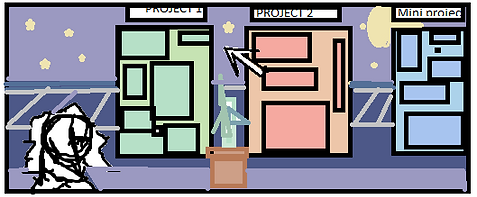
Mini preview of some slides on a certain project.
Layout for every project I've done.
When greeted at the home page I would like a small title card welcoming the person and transitioning to this small "game". The character in front will slowly walk and walk faster when you click the option to see more projects. When you hover over a project you will get a small preview on what it in tales. If you decide to click it you will fade into the slides.
Viewed Screen
Border
*Photos
*Text
*Videos
*Gallery's
*All my written and drawn work


The character that drags behind the mouse and jumps over to the next slide
Once at the certain page you want another small title card will appear saying what project is. However instead of "controlling the character" with the small arrow keys to see what other projects there are; you can move your mouse and the character will drag and follow behind it. When you move onto a new slide it will jump the border line. Some pictures when clicked might have a dialog option for the character which gives a small piece of information about it.

When you hover over a project I want to have a small piece of text state a small blurb of what is in this project and when it was made.



An idea on how the sprite could move around. However, I do plan to make it more detailed.
Inspiration
I was inspired by an older students portfolio where they used a car as a mouse and created a playable game in their portfolio. The style i was inspired by was Strawdew Valley and its soft pixel art style of backgrounds and characters. By making it interactive I'll stand out from other candidates and have a more unique portfolio.